How to Choose a Self-Order Kiosk for Your Restaurant or Retail Chain in 2026
By MHY Engineering Team · Updated · 14 min read
A self-order kiosk looks like a simple purchase: a touchscreen, a stand and a card reader. In practice it is an unattended point-of-sale computer running thousands of hours in a hot, greasy, high-traffic environment while taking real payments. The decisions made at specification time — screen, operating system, payment mix, peripherals and certification — determine both unit price and rollout pain. This guide, by the MHY engineering team (Shenzhen Minghongyu Technology Co., Ltd., a self-service hardware OEM/ODM manufacturer since 2016), follows the order we use when quoting chain projects. Browse our self-service kiosk line alongside it.
1. What is a self-order kiosk — and how is it different from self-checkout and POS?
A self-order kiosk is a touchscreen terminal where customers browse a menu, configure items (size, modifiers, combos) and pay before the order is prepared or picked. The order goes to a kitchen display or printer. Core users are QSR, cafes and food courts, but the same hardware serves click-and-collect, ticketing and service counters.
Buyers often use three terms interchangeably, though they describe different workflows:
| Term | Where it sits | What the customer does | Typical modules |
|---|---|---|---|
| Self-order kiosk | Front of restaurant, before food is made | Browses menu, customizes, pays, waits for preparation | Touchscreen, NFC/card, QR scanner, receipt printer, sometimes camera |
| Self-checkout kiosk | Retail exit area, after goods are chosen | Scans barcodes of physical goods, bags, weighs produce, pays | Touchscreen, 1D/2D scanner or scanner scale, payment, printer, anti-loss sensors |
| POS terminal | Staffed counter | Cashier scans and takes payment on the customer's behalf | Cash drawer, operator display (often dual-screen), scanner, printer |
The distinction matters because module placement and software differ: a restaurant self-order kiosk rarely needs a scale or cash drawer; a supermarket self-checkout cannot work without them. MHY manufactures all three form factors — see payment and POS terminals for staffed and hybrid models — sharing the same payment, printing and computing modules across them.
2. What self-order kiosks do for restaurants and retail
Payback depends on menu, labor cost and store layout, so we do not quote third-party percentages. What customers consistently report from deployments is qualitative and structural:
- Order accuracy improves when modifiers and upsells are shown visually and confirmed on screen, removing verbal miscommunication.
- Peak-hour throughput scales without adding registers; kiosks run in parallel while staff focus on preparation and handoff.
- Average order value tends to rise through consistent, programmable upsell prompts a rushed cashier may skip.
- Staff are redeployed from order entry to food quality, hospitality and cleaning.
- Ordering data becomes structured: every modifier, abandonment and payment is captured for analytics and loyalty systems.
The kiosk is not a cost-cutting robot. It is a standardization device — the same menu, prompts and payment flow in every store, every shift.
For typical store configurations, see our Restaurant & QSR and Retail & Supermarket solution pages.
3. The eight factors that define your kiosk specification
3.1 Screen size and orientation: 21.5, 23.6, 27 or 32 inch; flat vs curved
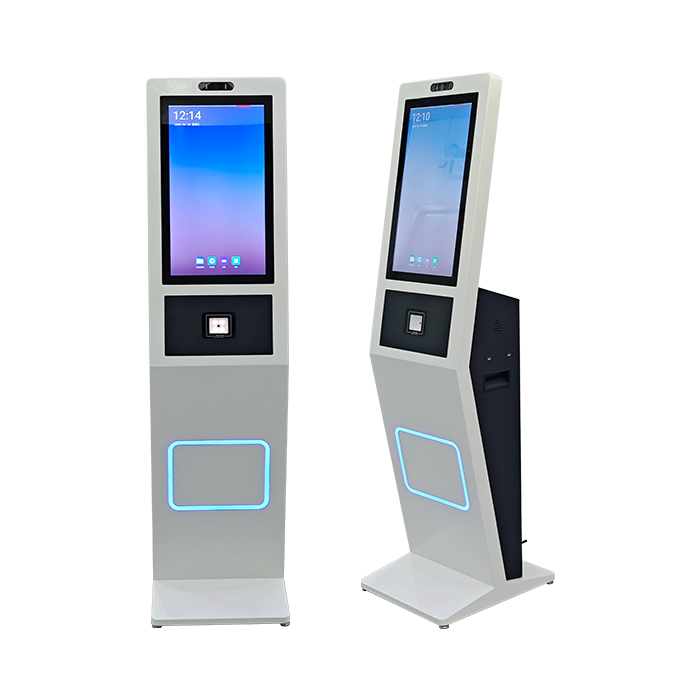
Screen size follows menu complexity and viewing distance. 21.5 inch fits counters and small cafes; 23.6 inch is the mainstream QSR size — large enough for image-rich menus and modifiers, compact enough for floor or wall mounting (the size of our 23.6-inch curved self-order kiosk); 27 inch suits high-volume stores; 32 inch serves accessibility and long viewing-distance installs.
Most kiosks are portrait, mirroring a phone-shaped menu flow with less floor depth; landscape suits wayfinding and short catalogs. Curved panels wrap toward the user, cutting glare and adding privacy for PIN entry; flat panels cost less and are easier to replace across a multi-year estate. Both run the same touch and software — the choice is ergonomic and aesthetic.
3.2 Touch technology: insist on projected capacitive (PCAP) multi-touch
Modern kiosks use projected capacitive (PCAP) glass touch — the same technology as a phone, with 10-point multi-touch and gesture scrolling. Unlike infrared frames or resistive films, PCAP stays durable behind thick glass, seals against spills and responds reliably to dry fingers. Specify tempered cover glass (3–6 mm) with anti-glare treatment for bright stores, and have glove-touch firmware tuned at production if needed.
3.3 Operating system: Android vs Windows (and Linux/Ubuntu)
The OS decision should follow your software, not the reverse. A web-based or Android-native ordering app suits an Android kiosk — fast boot, lower unit cost and easy lockdown via a kiosk launcher or MDM. Choose Windows when you must reuse a Windows POS client, depend on a Windows-only payment driver or need full x86 peripheral compatibility. Linux and Ubuntu suit integrators who build a locked image themselves.
| Criterion | Android | Windows |
|---|---|---|
| Hardware cost | Lower (ARM or x86 options) | Higher (x86 platform + OS license) |
| Boot speed & lockdown | Fast boot; kiosk-mode launchers mature | Boots slower; locked via assigned access / shell replacement |
| Best for | Web apps, cloud ordering, new greenfield chains | Legacy POS software, specific x86 drivers, complex local peripherals |
| Remote management | MDM apps or custom OTA updates | Existing Windows device-management tooling |
| Payment software ecosystem | Modern payment SDKs widely available | Broadest historical acquirer/PSP support |
MHY ships self-service kiosks on Android, Windows, Linux and Ubuntu and can preload your image and lockdown policy at the factory.
3.4 Payment integration: NFC, cards, QR wallets and cash
Define the payment mix per market before industrial design — each device needs cabinet space, USB/RS232 ports and a fixed mounting position:
- ✓ NFC / contactless for tap-to-pay cards and mobile wallets — the default for new QSR projects.
- ✓ IC chip and magnetic stripe readers where card-present infrastructure still requires them.
- ✓ QR scanner or camera for wallets, loyalty codes and app payments — standard across Asia and growing elsewhere.
- ✓ PIN pad when local debit schemes require online PIN.
- ✓ Bill acceptor and coin module for cash-heavy locations; these add cost, cabinet depth and cash-logistics work.
Two integration models exist: the factory integrates a certified payment terminal from a provider (the terminal owns PCI scope), or you integrate your acquirer's SDK on the kiosk OS. Most chains choose the first — it keeps the kiosk and your software out of payment-certification scope. Our payment and POS terminal line covers unattended and staffed variants.
3.5 Peripherals: printer, scanner, camera and accessibility
The printer is the highest-service peripheral in any kiosk: specify an 80 mm thermal printer with auto-cutter and near-end sensor, front access for paper swaps, and a paper width your ops team can source locally. A 1D/2D scanner handles loyalty and coupons even when payment is card-only; an integrated camera supports loyalty QR, age-verification snapshots and remote-assistance calls. Also consider speakers and microphone, LED status rings and a physical call button. Accessibility — reach height, screen angle, audio prompts and contrast — is increasingly written into chain standards; pair a floor-standing unit with a countertop reachable unit where required.
3.6 Mounting and form factor: floor-standing, wall or countertop
- Floor-standing — flexible placement in the queue line, room for paper rolls, cash modules and UPS; the QSR default.
- Wall-mounted — saves floor space in narrow stores; limits paper capacity and reach-height flexibility.
- Countertop — smallest footprint, for cafes, concessions and as the accessible companion to a floor unit.
Cable management, a lockable service door and ventilation clearance belong in the drawing review, not the installation visit. MHY supports all three mount types plus full OEM enclosure design when a chain needs its own silhouette.
3.7 Durability: IP rating, fanless design and 24/7 duty cycle
Restaurant air carries grease and moisture, and kiosks are touched thousands of times daily, so commercial-grade components matter. Ask for a front-bezel IP rating — IP54 covers splash and wipe-downs in most QSR environments, while our industrial line offers IP65 front protection for wash-down and outdoor-adjacent sites. Fanless cooling removes the most common failure point (fans pulling grease-laden air into the chassis) and runs quieter and longer. Confirm panels, power supplies and touch controllers are rated for 24/7 unattended duty, and check warranty terms: MHY offers an optional 3-year warranty, 24/7 technical support, spare-parts kits and remote diagnostics for chain accounts.
3.8 Software and SDK integration
Hardware is half the project: document how your application controls each peripheral — OS, protocol (USB HID, virtual COM, RS232) and SDK/sample-code availability. A serious manufacturer supplies drivers/SDKs for printer, scanner, NFC/RFID, camera and payment bridge on your OS, as we do for ID and passport readers. Run a one-unit integration pilot on your software before bulk production — the cheapest insurance in the project — and confirm remote management, offline behavior and power-cut recovery.
4. Total cost, MOQ and the OEM/ODM process
Unit price is visible; total cost determines project profit. Compare quotations on the same basis: panel grade and brightness, glass thickness, processor/RAM/storage, printer and payment-device brands, ports, accessories (UPS, floor anchors), warranty and spares policy, and who certifies the exact configuration. A quote that swaps the printer or omits certification reports is not actually cheaper.
MOQ at a manufacturer like MHY is flexible. Standard models support single-unit samples and tiered volume pricing; custom enclosures, colors or tooled parts carry a higher MOQ because tooling and line setup are fixed costs. A sensible rollout: one sample for validation, a 5–20-unit pilot in selected stores, then scheduled volume frames.
The typical OEM/ODM factory flow:
- Specification & ID design — use case, modules, target markets, branding and 3D design.
- Prototype — hand-built sample with your modules, color and logo for approval.
- Pilot run & certification — small batch tested with your software; target-market compliance confirmed.
- Mass production & QC — assembly, aging, reliability tests, final inspection and export packaging.
Lead time scales with customization: standard samples ship in 3–7 days and bulk in roughly 15–30 days; custom OEM/ODM projects typically need 35–60 days from prototype approval to mass production. MHY runs a 4,000 m² factory with 100+ staff (35%+ in R&D), 500+ standard products and exports to 100+ countries — see the OEM/ODM service page; quotations come back within 24 hours.
5. Certifications to ask for, by target market
Certification belongs to the exact configuration you import — enclosure, power supply, radios and payment peripherals all matter. Request signed certificates for the precise model and module list, not generic company certificates:
- European Union: CE marking with supporting EMC/LVD and radio (RED, where wireless applies) reports; RoHS for restricted substances; WEEE registration is typically the importer's responsibility.
- United States: FCC compliance (emissions; FCC ID where radio modules are used); UL/ETL-recognized or -listed electrical safety is commonly demanded by retail landlords and insurers; PCI scope handled by the certified payment terminal.
- Other markets: local equivalents such as UKCA (UK), RCM (Australia), PSE/MIC (Japan) — ask early, as some require samples to be tested locally.
- Factory system: ISO 9001 quality management; social and environmental audits if your procurement policy requires them.
MHY standard products are CE, FCC and RoHS compliant under ISO 9001, with CCC for China and IP65-rated industrial models. OEM changes — new enclosures, added radios or swapped power supplies — may require re-testing, flagged at the design freeze.
6. Common mistakes — and a quick selection table
Most kiosk project problems we are asked to rescue share one of these roots:
- ✗ Buying on unit price alone, then discovering no SDK for the printer under their OS.
- ✗ Specifying cash modules "just in case" in effectively cashless markets — paying for cabinet space and servicing never used.
- ✗ Choosing a consumer-grade display without 24/7 panel rating, then seeing backlight failures in year one.
- ✗ Locking enclosure design before the payment device is certified, forcing a late mechanical redesign.
- ✗ Skipping the integration pilot and discovering driver conflicts only when 100 units land in-country.
- ✗ Ignoring service access — paper rolls that require a screwdriver to replace cost labor every single day.
Scenario-to-spec quick table
| Scenario | Recommended starting configuration |
|---|---|
| QSR / fast casual, high footfall, card-first market | 23.6″ curved or flat portrait floor-stander, PCAP, Android, NFC + QR, 80 mm printer with auto-cutter, fanless, IP54 front |
| Cafe / bubble tea, small counter | 21.5″ countertop or wall-mount, Android, NFC + QR, compact 58/80 mm printer |
| Chain reusing existing Windows POS software | 27″ floor-stander, Windows x86, certified external payment terminal, full SDK/driver pilot |
| Cash-heavy market or transport hub | 32″ or 27″ floor-stander with bill acceptor + coin recycler, UPS, larger cabinet, secure service door |
| Retail click-and-collect / service counter | 21.5–27″ countertop or wall unit, 2D scanner, camera, QR/NFC, queueing or ticket integration |
| Outdoor-adjacent / wash-down environment | IP65-front industrial model, fanless, high-brightness panel, sealed connectors |
These are starting points, not finished bills of materials. Send us your menu complexity, daily volume, payment mix, store footprint and target countries — our engineers will return a priced configuration within 24 hours: request a quote.
7. Frequently asked questions
What screen size is best for a self-order kiosk?
Should I choose Android or Windows for self-order kiosks?
Can a self-order kiosk accept both card and mobile payments and cash?
What is the typical MOQ when ordering kiosks directly from a manufacturer?
How long does OEM/ODM kiosk production and sampling take?
What certifications should a self-order kiosk have for the EU and US markets?
Are curved screens better than flat screens for self-ordering?
Can MHY kiosks integrate with our existing POS or ordering software?
Have a specification in mind — or still deciding?
Send us your use case, quantities and target markets — our engineers will recommend a configuration and quote within 24 hours.